Can Smart Film Work as a Rear Projection Screen?

Can smart film work as a projection screen? Yes. In its frosted state, switchable film becomes a flat, evenly diffusing white surface — which is exactly what a projection screen is. Point a projector at the frosted glass and it carries a bright, edge-to-edge image; switch the film clear and the screen disappears back into an ordinary window.
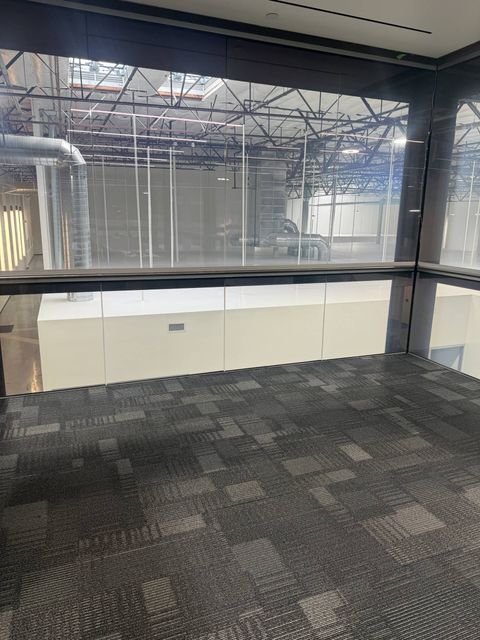
Most owners buy switchable glass for privacy and discover the second act later: the same wall that frosts for a closed-door meeting is also the biggest screen in the building, already mounted, already wired, and invisible when it is not in use. Here is how it works, where it makes sense, and the honest limits.
What makes the frosted state a screen
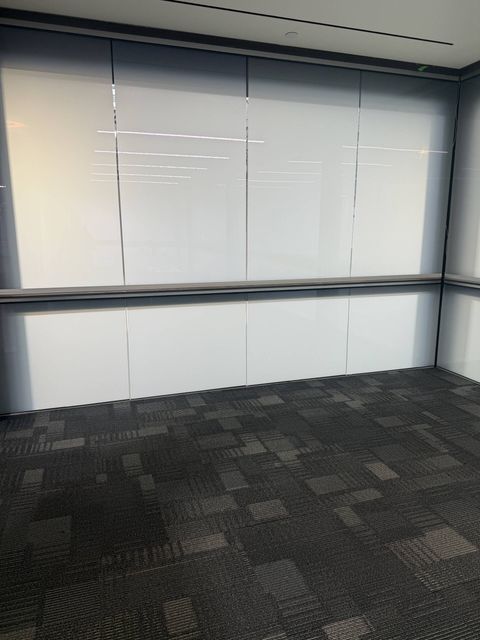
A projection screen has one job: catch light and spread it evenly back toward the room, with no hot spots and no texture of its own. That is the same behavior that makes frosted PDLC private — the liquid-crystal layer scatters light uniformly across the whole pane, settling into the flat white you see in the photo above. Glass adds one more advantage a fabric screen cannot match: it is rigid and dead flat, so there are no ripples, waves, or keystone-bending in the surface itself.
Because the frost is translucent rather than painted-on white, light also passes through it — which is what opens up rear projection. An image thrown from behind the glass forms in the frosted layer and reads cleanly from the front, something an ordinary wall or opaque screen simply cannot do.
Should the projector go in front of the glass or behind it?
Both work, and the room usually decides. Front projection treats the frosted pane like a conventional screen: the projector sits on the room side, ideally a short-throw model mounted close to the glass so nobody walks through the beam mid-presentation. It is the simplest setup and the right one when the space behind the glass belongs to someone else.
Rear projection is the polished version. The projector hides behind the glass — in the next room, a service corridor, or a cabinet — throwing the image through the pane with its picture flipped in the projector's settings. Nobody shadows the image, no hardware shows in the room, and the glass appears to glow on its own. Storefront installs almost always run this way, with the projector inside and the image facing the sidewalk.
Either way, remember the division of labor: the film is the surface, and the projector makes the picture. A dim room delivers a crisp image from almost any modern projector, while a sun-filled space needs serious brightness to compete — the glass cannot fix an underpowered projector.
Where a switchable projection wall earns its keep
Conference rooms are the natural fit. A glass-walled meeting room frosts for privacy the moment the meeting starts, and that frosted wall is exactly where the deck can live — no monitor bracket, no pull-down screen slowly yellowing above the whiteboard. Rooms like the three conference rooms we upgraded for AmaWaterways at their Calabasas headquarters are the setting this was made for: walls that switch between open glass and private frost on command, with every frosted panel a ready projection surface.
Storefronts get a second shift out of their glazing. Frost the window at closing time and loop a brand reel or lookbook onto it from inside — the glass sells while the store sleeps, then clears again at opening. And at home, a media room or living room with switchable panes gets movie night on demand: frost, project, and the "screen" is gone again before the popcorn bowl is washed.
None of this requires new glass. Retrofit smart film bonds to the panes and partitions you already have, so an existing glass wall can pick up both jobs — privacy and projection — in a single install.
Smart projection film for retail windows and hospitality spaces
In retail and hospitality, the same pane does two jobs on a schedule. Frosted, the film is the screen: a projector set back inside the store or behind a lobby partition throws the image onto the glass, and it reads from the street or the room as a bright, glowing display. Clear, it is the view again — the merchandise, the dining room, the courtyard. A boutique can run a lookbook after hours and open its window to shoppers in the morning; a hotel lobby, restaurant, or event space can frost a glass partition for a welcome message or a private-event backdrop, then clear it when the room opens up. There is no separate projection product involved — it is the same switchable smart film that provides privacy, doing a second job while it is frosted.
The honest limits
The image only exists while the glass is frosted. Powered clear, the film is a window again and holds no picture — that is the feature, not a flaw, but it means the screen and the view take turns.
The picture is also visible from both sides of the pane — mirrored on the far side — so plan for what the other side of the glass sees, especially in an office. And the frost changes what people see, not what they hear: audio is the sound system's job, and a frosted wall provides no acoustic separation.
Finally, quality follows the components. Film grade sets how white and even the surface is — our spec sheets are available on request — the projector sets brightness and resolution, and the low-voltage wiring that powers the switching is run by our licensed crew (CA lic. #1134029), not left dangling down the glass. As for budget: a single small pane usually starts around $1,500 fully installed and scales with glass area and controls — the smart glass cost page walks through the real numbers.
Questions people ask about projecting on switchable film
Do you need a special projector for smart film?
No. Any decent home or office projector works — the frosted film is simply the surface it lands on. A short-throw model helps in tight rooms and keeps people out of the beam, and the brighter the room, the more lumens you will want.
Can you watch the projection from both sides of the glass?
Yes. The frosted layer renders the image on both faces of the pane, with the far side seeing it mirrored. Projectors have a flip setting for exactly this, so you orient the picture toward the side that matters — outward for a storefront, inward for a meeting room.
Does the glass still work as a normal window afterward?
Completely. Nothing about projection is permanent or dedicated — the pane is a clear window whenever it is powered, a private frosted wall when it is not, and a screen only while a projector is pointed at that frost. You can switch states as often as you like.
What does a switchable projection wall cost?
A single small pane usually starts around $1,500 fully installed and scales with glass area, panel count, and controls — a full wall is quoted per project. The estimate is free and remote: send photos and rough dimensions to Smart View Film Solutions and you will have real numbers within one to two business days.
If you have a glass wall, a storefront, or a media room that could be doing double duty, send a couple of photos and rough dimensions — we will tell you honestly whether switchable film fits the plan, and what it costs. Request a free estimate or call Smart View Film Solutions at (866) 728-9888, and you'll have real numbers within one to two business days.